We use cookies to ensure you get the best experience on our website — learn more about privacy .
All
Q1 '26
Quarterly Update

FoodBevBiz Editions

Q1 '26 delivered some of our most requested features yet; FoodBevBiz now includes a powerful API for accessing your data from external tools, new Custom Metrics so you can build your own formulas and KPIs, and Operational Costs to give you a clearer view of true store profitability. Also shipped: AI-powered segments, multistore velocity tracking, webhook exports, Gmail order schema, custom fonts in Engage, and more.

Reporting

Custom Metrics

Combine existing metrics, KPIs, and even segment totals to create your own formulas. Use these in your FoodBevBiz dashboards, email digests and even access them via the FoodBevBiz API.

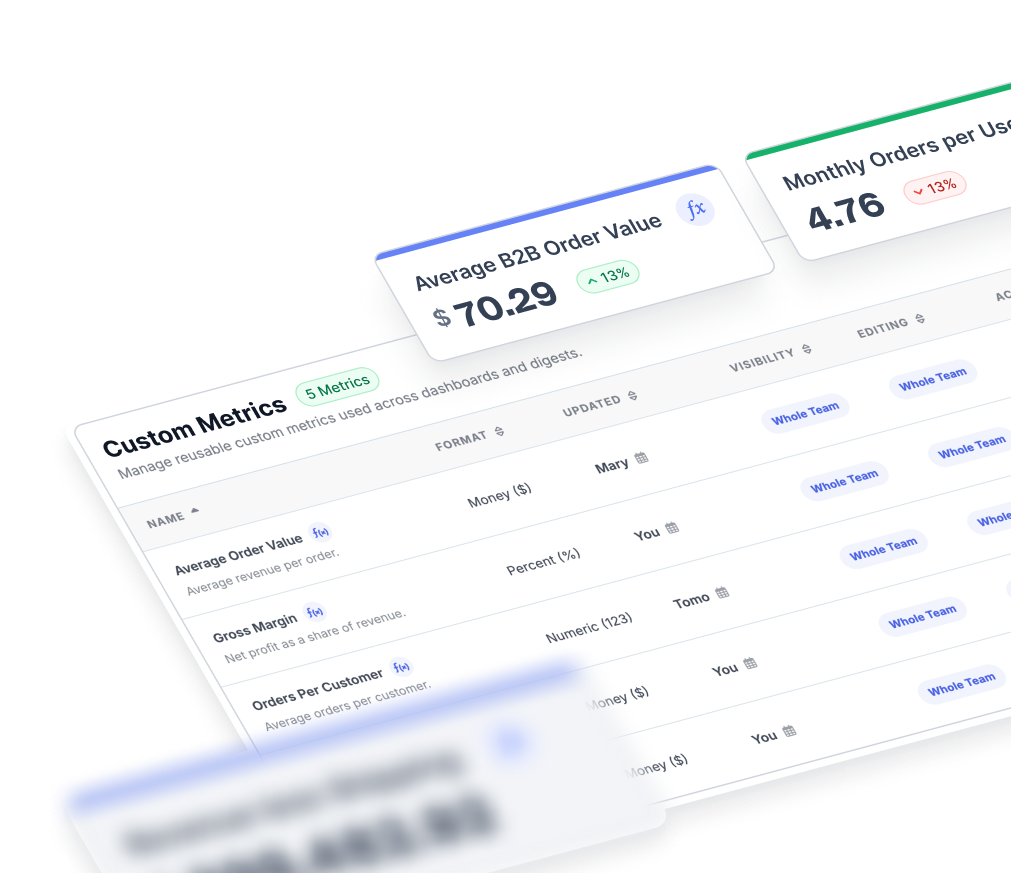
FoodBevBiz Custom Metrics builder combining KPIs and segment totals into a new formula
Engage

Engage Builder Refresh

A cleaner email builder experience with UX improvements that make campaign creation faster and easier to navigate.

Multistore

Multistore Product Sales & Velocity

Track product sales and stock velocity across multiple stores, and control which stores appear on your multistore dashboard.

Segmenting

AI-Powered Segments

Stuck on building a segment? Ask Jarvis AI for help. Available throughout the app — click "Segment with AI" and Jarvis will create a segment for you, or update an existing one.

FoodBevBiz Jarvis AI assistant interface for building customer segments from a natural-language prompt
API

FoodBevBiz API

Leverage FoodBevBiz's raw data, sales and profit figures directly into your tech stack. Get secure access to live store data via simple JSON endpoints. You can search products, customers and orders, pull detailed product, customer and revenue performance, as well as programmatically manage your Engage profiles and unsubscribes. It's FoodBevBiz wherever you need FoodBevBiz.

Products

Views & CR % on Products

See your website views and conversion rate for multiple products at once on the product segmenting page.

Exporting

Exports to Webhooks

Recurring exports can now post to a webhook, including the download URL, for easier automation into your own systems.

Segmenting

Weekday & Weekend Filters

Date filters now have a weekday/weekend option for more precise segmenting.

Carts

Cart Conversion Time Report

The carts report now includes a time-to-order chart so you can see how quickly recovered carts convert.

Costs

Operational Costs

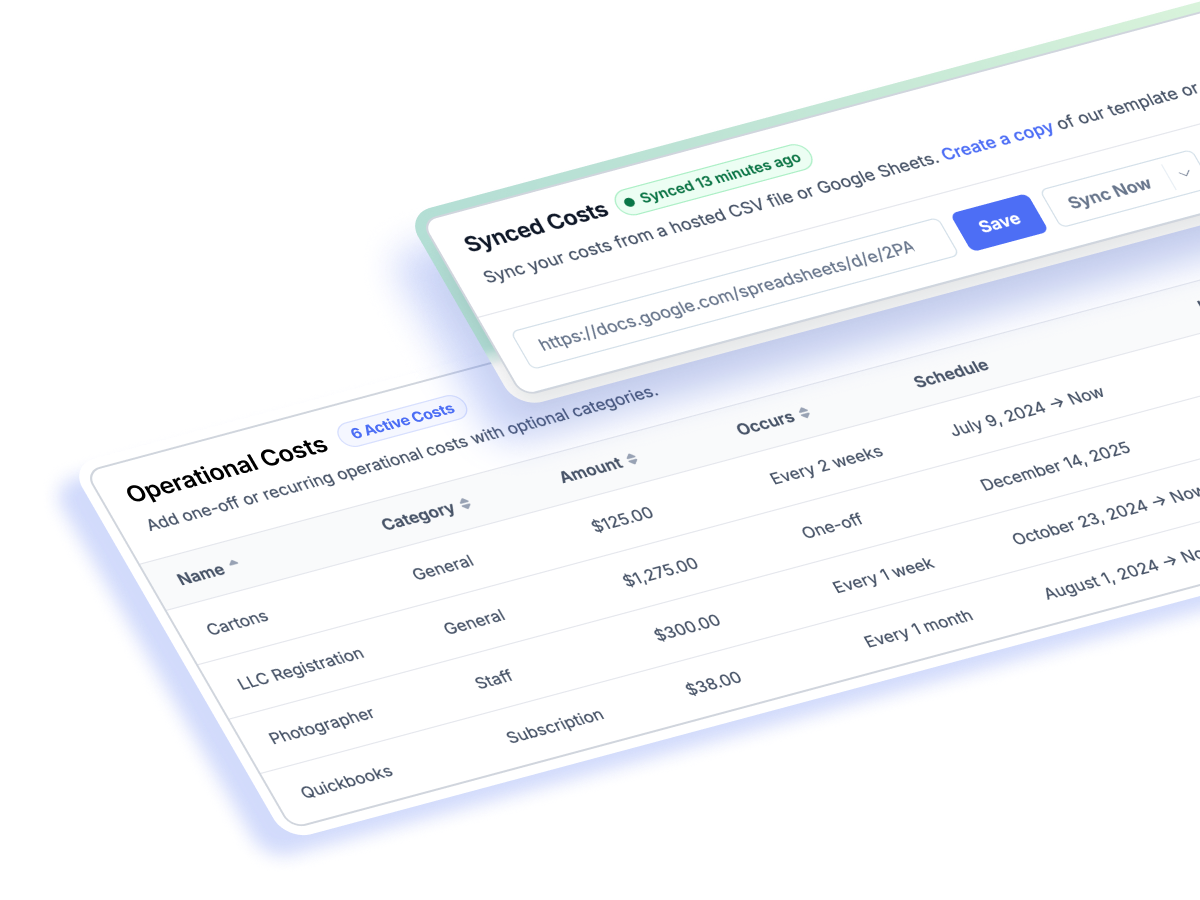
Get a complete picture of your store's profitability by adding operational costs to FoodBevBiz. Include rent, salaries, web hosting, accounting subscriptions — whatever keeps your business running. Set them up as recurring or one-off expenses, enter them manually, or sync from a Google Sheet.

FoodBevBiz Operational Costs dashboard listing recurring and one-off business expenses
Engage

Gmail Order Schema

Add Gmail order schema support to give your customers richer order email information directly inside their inbox.

Engage

Subject Line Grading

Get instant feedback on subject lines so you can refine email performance before you hit send.

Engage

Custom Fonts in Engage

Bring brand typography into the drag-and-drop email builder with support for custom fonts.

About this release

A quick rundown of what shipped this quarter and how to get started.

What's new in FoodBevBiz Q1 '26?
The Q1 '26 FoodBevBiz Edition introduces the FoodBevBiz API for external data access, Custom Metrics for building your own formulas from existing KPIs and segments, and Operational Costs tracking for complete store profitability. This release also includes AI-powered segment building with Jarvis, multistore product sales and velocity tracking, webhook-based recurring exports, Gmail order schema support in Engage emails, custom fonts in the email builder, subject line grading, a new cart conversion time report, and more.
How do I access the new FoodBevBiz API?
Generate an API key under your FoodBevBiz store settings at foodbevbiz.com/register The FoodBevBiz API gives secure read access to live store data via simple JSON endpoints — covering orders, products, customers, segments and Engage profiles. Full documentation is available at foodbevbiz.com.
What are Operational Costs in FoodBevBiz?
Operational Costs let you add non-product business expenses such as rent, salaries, software subscriptions, and hosting, so FoodBevBiz can calculate true store profitability beyond product-only COGS. You can configure costs as recurring or one-off, enter them manually in the app, or sync them automatically from a Google Sheet.
What are FoodBevBiz Custom Metrics and how are they different from reports?
Custom Metrics let you combine existing metrics, KPIs and segment totals into your own formulas. Unlike a fixed report, a Custom Metric becomes a reusable KPI that appears across FoodBevBiz dashboards, email digests, and the FoodBevBiz API.
How often are FoodBevBiz Editions released?
FoodBevBiz Editions are quarterly product updates, with occasional mini editions in between for features we can't wait to share. Each edition bundles the features, improvements and new reports shipped into a single changelog.